
Listing and Promotion of Properties
List your property portfolio on Cyprus-Real.Estate and receive enquiries straight from your listing cards. And if you want your properties noticed sooner, add promotion: Priority+ and articles about your company and projects.
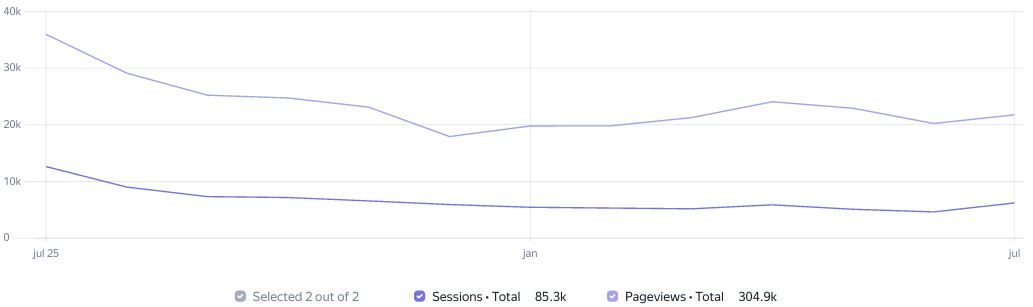
1. Visitor Statistics Cyprus-Real.Estate for the Last Month
5,373 visitors viewed 21,681 pages and spent a total of 267 hours, or 11 days, on the website.
On average, our website is visited by at least 179 people daily. Each of them views more than 3.5 pages per visit.
Analytics systems data from July 2025 to July 2026.
2. Property listing
Both companies with a large property portfolio and private owners with a single property can list on Cyprus-Real.Estate. Agencies, developers, and brokerages are served by package plans based on the number of active properties. Private individuals can list a single property at a separate rate.
What's included:
Property upload via XML / API or an agreed import
A company page on the portal
Enquiries straight from your listing cards
Moderation and keeping listings up to date
Monthly property analytics
A limit of active properties according to the chosen package
2.1. Listing for companies and the pricing table
The monthly price depends on the number of your active properties.
Package | Price / Period | Price per property |
Portfolio 20 | €90 / 90 days | €1.5 |
Portfolio 50 | €60 / month | €1.2 |
Portfolio 200 | €200 / month | €1 |
Up to 500 properties | €475 / month | €0.95 |
Up to 1,000 properties | €850 / month | €0.85 |
Up to 2,000 properties | €1,500 / month | €0.75 |
Prices are in euros per calendar month. Non-standard imports are discussed separately.
2.2. Listing for private individuals
If you are selling or renting out a single property as a private owner, you can list it separately, without signing up for a company package plan. The property goes through moderation, is published on the portal, and receives enquiries straight from its card.
Service | Details | Price |
Single property listing | For a private individual / private owner | €15 / month |
3. Priority+
Priority+ is an add-on service for portfolios listed on Cyprus-Real.Estate. It raises selected properties higher in the results, brings them onto the first page, and highlights them with colour and a label. That way users see your properties sooner, which helps increase views and enquiries. The service is paid for separately from portfolio listing.
3.1. What Priority+ gives you
Higher in the results — selected properties rise above standard listings in search results and category lists.
First page and homepage — properties land in the most visible spots, where they are seen first.
Colour highlighting and a label — the card gets a contrasting fill and a label, for example Premium, so it stands out from the rest.
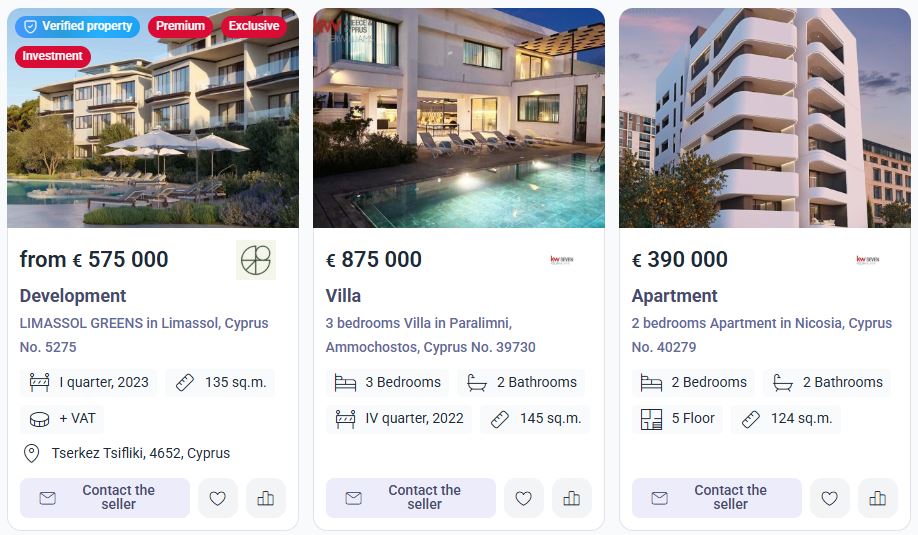
Example: a property card with Priority+ is filled with a contrasting colour, marked with a label, and rises higher in the results.
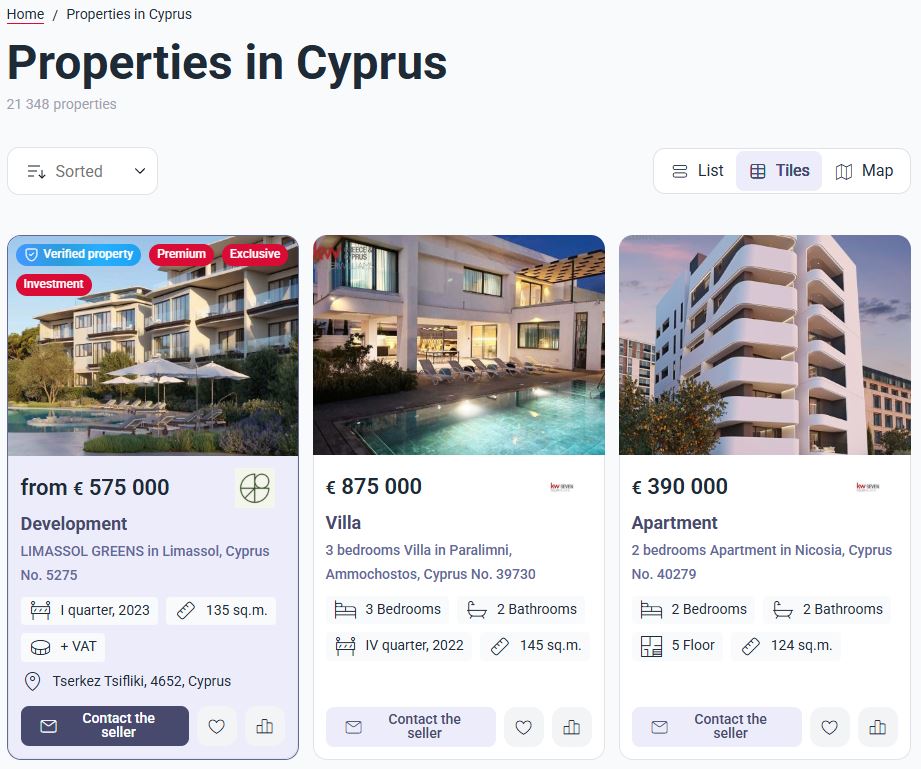
How a property card with Priority+ looks in list view:
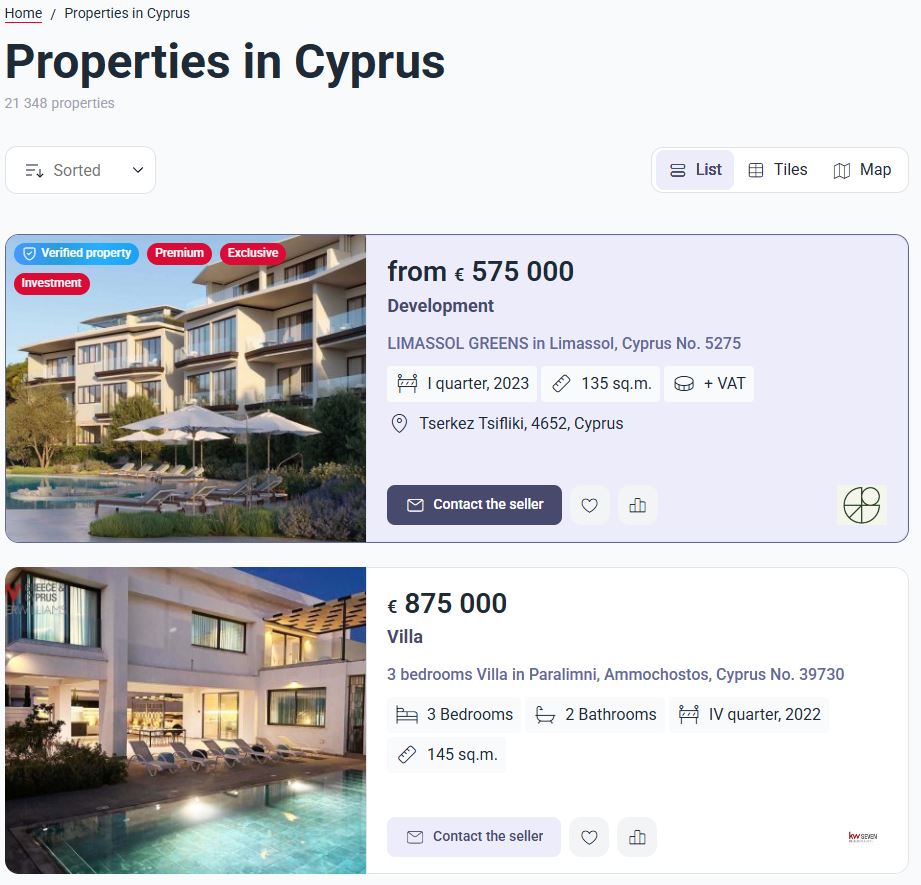
Option for displaying an object card with a label:
3.2. Why it works
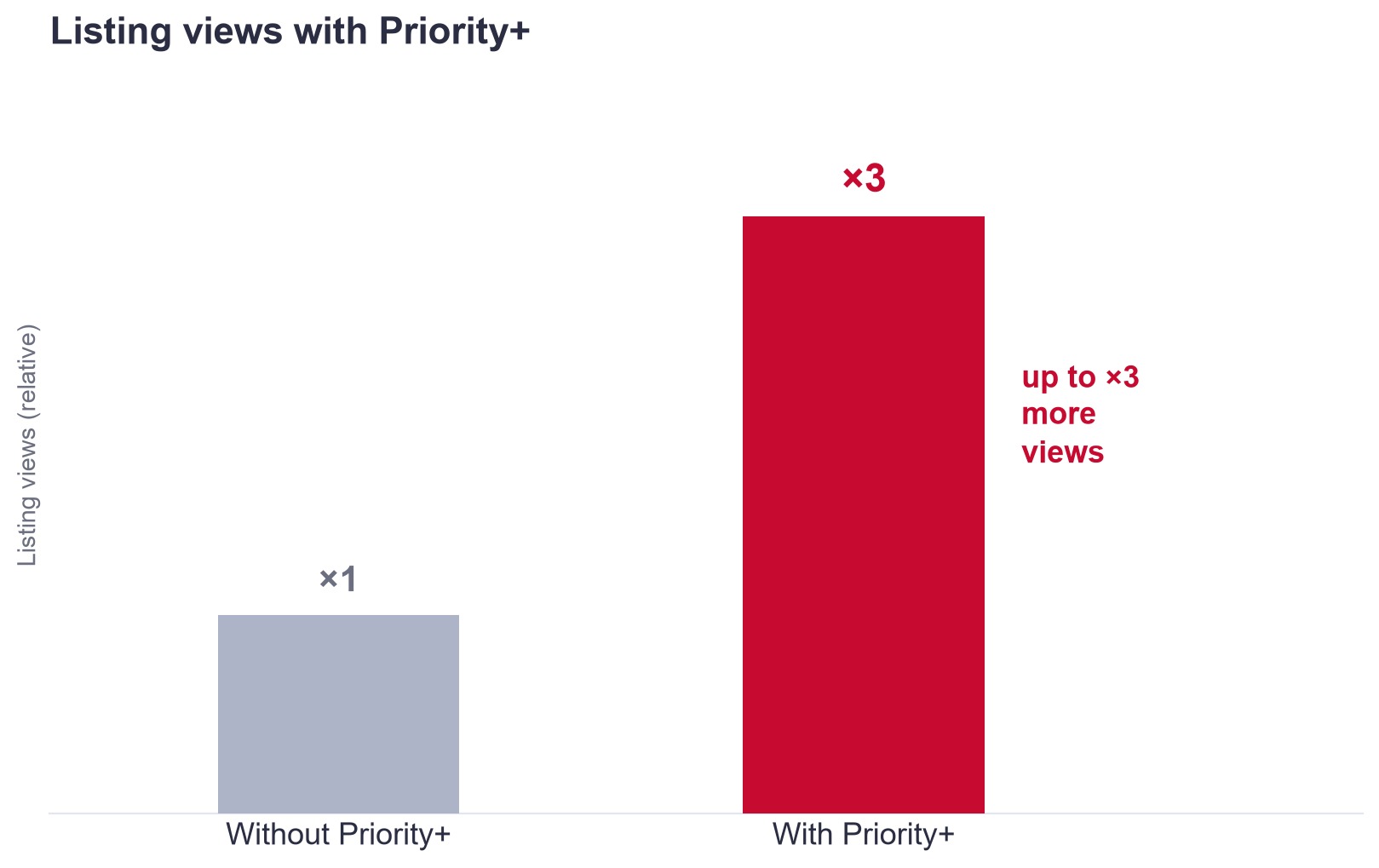
Properties with Priority+ are shown higher in the results and on the first page, so they get noticed sooner. The higher the position and the more eye-catching the card, the more clicks and views. On average this gives up to ×3 more views compared with a standard listing — and therefore more enquiries from the same properties.
3.3. Basic listing and Priority+
Priority+ does not replace listing — it reinforces it. Listing publishes your portfolio on the portals; Priority+ makes selected properties more visible.
Feature | Basic listing | With Priority+ |
Publication on Cyprus Real Estate | ✓ | ✓ |
Company page and enquiries from cards | ✓ | ✓ |
Position in the results | standard | above competitors |
First page / homepage | — | ✓ |
Colour highlighting and a label | — | ✓ |
Property views | baseline | up to ×3 |
3.4. Priority+ coverage
For properties in Cyprus, Priority+ applies on the Cyprus-Real.Estate showcase. The boost works within this single portal: selected properties rise higher in the results and are highlighted with colour and a label.
3.5. How to activate
Submit a request — choose the properties you want to boost.
Confirmation — we confirm the coverage and terms, then issue an invoice.
Launch — after payment, the properties rise in the results and receive their highlighting.
4. Articles about your company and properties
We prepare and publish articles about your properties and company on the portal. This helps attract extra traffic from search and build more trust with the audience. We take care of the text and layout — all we need from you is the source material and your approval.
About a property
Property description — the classic format: the development name, advantages, price, extra options, completion date.
A property as a story — not a dry description but a story: what makes the property interesting, who it suits, where its strength lies. A "problem → solution" format is possible ("you needed to move to the centre quickly — here is how this property meets that need").
Property FAQ — answers to common questions: documents, layout, deal terms, mortgage, utility costs. The same piece can also cover transaction transparency, document checks, support, and a safe purchase.
A selection of similar properties — several suitable options for the buyer and a comparison with alternatives: why the property is better than others in the same price range, area, or segment.
Expert commentary — the view of a partner, realtor, broker, or lawyer on why the property is a good deal and what to look out for.
Area guide — a piece about the location: infrastructure, transport, schools, parks, the upsides for living and investing. It can also cover the lifestyle in the property: light, views, layout, the rhythm of the area.
About the company and expertise
Content not just around "the property is on the site," but around trust, expertise, and the buying journey — a mix of personal brand, case studies, useful material, and behind-the-scenes.
Personal brand — a piece about you, your approach, and your USP: why working with you is safe and convenient.
Case studies and client stories — a "how we sold it in 5 days" or "how we handled a difficult deal" format as social proof.
Useful material — checklists, buying tips, a breakdown of common mistakes.
Behind the scenes — how the work goes: property viewings, dealing with developers, an agent's daily routine.
How it works: you choose the format and provide the source material (the property, the facts, and if you like — voice notes or permission to use your brand); the rest — text, structure, and publication — we take on ourselves.
5. Banner placement
You can place advertising banners for your company or project on the portal. Everyone who visits the page sees your banner, not only those who opened your listing — this works on brand awareness and reach. On click the banner leads to your property, your company page or an external site. You can supply the creative yourself, or we prepare it from your materials.
5.1. Homepage banner
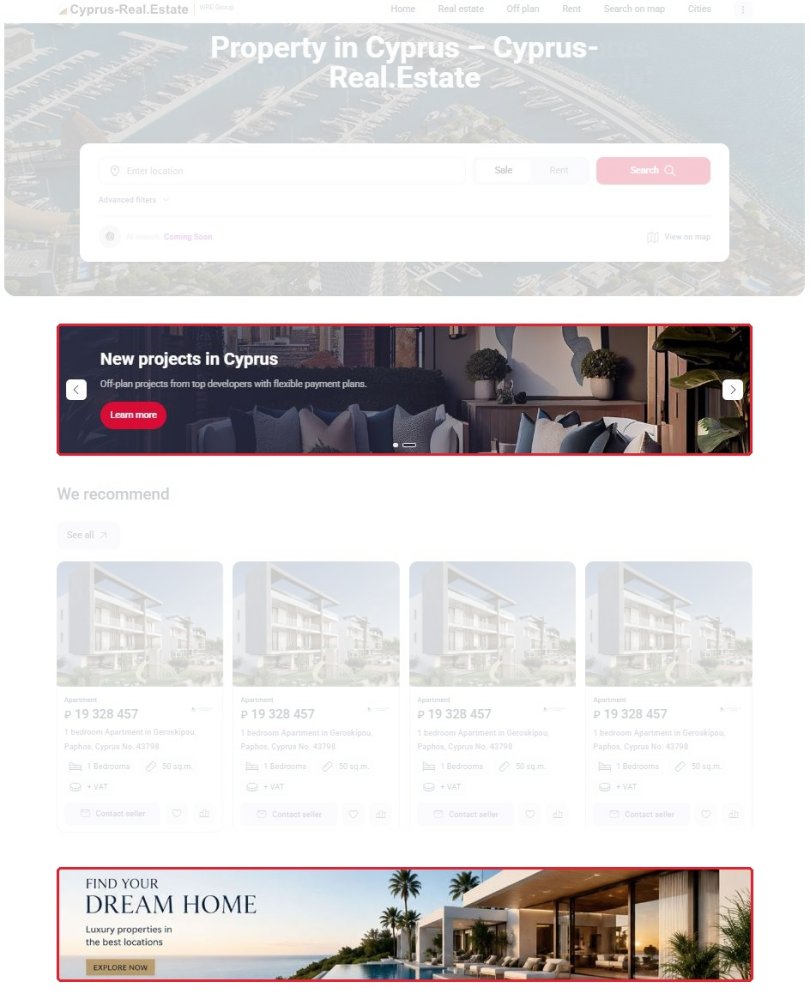
A wide full-width banner is placed on the portal's homepage, below the block of recommended properties. This is the most visited page of the portal: the visitor sees the banner right after the first selection of offers, before moving on to the catalogue. The format suits image advertising for a developer or the announcement of a specific project.
Homepage banner example:
5.2. Banners in the catalogue and on property pages
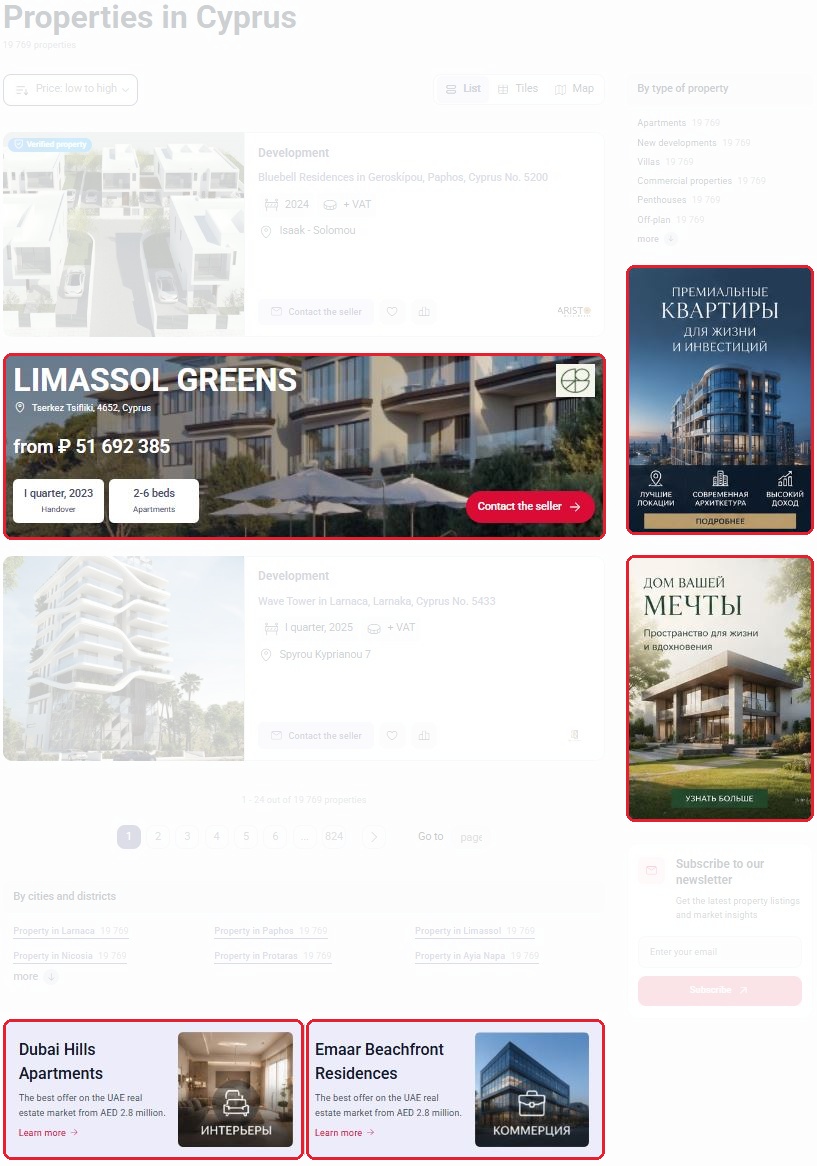
In the property catalogue a banner is placed in three positions:
In the listing feed — a large banner card built directly into the search results between offers and styled as a premium listing: project name, location, starting price and a call-to-action button.
In the side column — vertical banners to the right of the results, next to the property type filters.
At the bottom of the page — compact banners with a heading, a short description and a link, below the list of properties.
Banners run across all catalogue pages and in both display modes — list and tiles. Unlike the homepage, here the banner is seen by an audience that is already choosing a property.
Catalogue banner example:
6. Service pricing
The table below brings together all the portal's promotion services and their prices: property listing, Priority+ priority placement, articles, banners, a complex showcase, and a complex landing page. Some services are billed monthly, others one-off or per year — the unit is shown next to the price. For the mailing, a minimum is shown ("from"); the exact price is calculated individually.
Service | Details | Price |
Property listing | Up to 500 properties (€0.95 per property) | €475 |
Property listing | Up to 1,000 properties (€0.85 per property) | €850 |
Property listing | Up to 2,000 properties (€0.75 per property) | €1,500 |
Priority+ | Boosting the visibility of selected properties across the Cyprus-Real.Estate | €300 / month |
Homepage banner | Banner placement on the portal's homepage | €500 |
Banner in the catalog | Placement in the search results feed, sidebar, or at the bottom of property catalog pages | upon request |
In-article banner | Placed permanently; available as an add-on to an article | €300 |
Badge highlighting | Price per 1 badge | €7 |
Residential complex showcase | A dedicated showcase for the complex within the portal | €360 / year |
Complex landing page | Domain and promotion are not included — discussed as a separate engagement | €1,000 |
Database mailing | Price depends on the volume and parameters of the mailing | from €200 |
Longread | An in-depth piece about the company or project | €1,400 |
Interview | A piece in interview format | €600 |
Guide | A practical guide (to an area, buying, etc.) | €500 |
Review | An overview article about a project or segment | €400 |
Publishing a ready-made article | Placing the client's material after editorial approval | €300 |
Translation into an additional language | Translating the material into one more language | €100 |
7. Sample calculation
Service | Details | Price / month |
Property listing | 700 properties → "Up to 1,000" package | €850 |
Priority+ (optional) | Visibility boost across the Cyprus-Real.Estate | €300 |
Homepage banner | Banner placement on the portal's homepage | €500 |
Total | Listing + Priority+ + Homepage banner | €1,650 |
Listing can be set up without Priority+ — the boost can be added at any time.
Frequently asked questions
The price depends on the package you choose, based on the number of active properties. For example: 400 properties fit the "Up to 500" package at €475/month; 700 properties — the "Up to 1,000" package at €850/month (about €0.85 per property); 1,500 properties — the "Up to 2,000" package at €1,500/month. The larger the portfolio, the lower the price per property.
Portfolio upload via XML / API or an agreed import, a company page on the portal, enquiries straight from your listing cards, moderation and keeping listings up to date, as well as monthly portfolio analytics.
The price depends on the number of active properties: up to 500 properties — €475/month, up to 1,000 — €850/month, up to 2,000 — €1,500/month. The larger the portfolio, the lower the price per property. Choose the package based on the actual number of properties you plan to keep active.
Yes. If you have more properties than your chosen package, you can move up to a higher package or, for large portfolios, agree on individual terms and a volume discount. Write to us — we'll find the option that best fits your volume.
Create a personal account ("Sign-up"), then fill in your company profile — it forms your page on the portal. After that you can add properties.
Two ways: manually through your personal account; or automatically via an XML / API feed. Once connected, listings go through moderation and are kept up to date, with a limit of active properties according to your package.
When uploaded via an XML feed, property prices and statuses update automatically at every sync. Listings added manually are edited in your personal account.
Enquiries come straight from your listing cards and your company page to your own contacts. You deal with the buyer directly, with no intermediaries.
Besides basic listing there is an add-on Priority+ plan — it raises selected properties higher in the results, brings them to the first page, and highlights them with colour and a label. This increases the visibility of listings and the number of enquiries.
Yes. Priority+ applies to selected properties in your portfolio — you decide which listings to promote.
Basic listing publishes your properties on the portal, while Priority+ boosts their visibility: higher in the results, onto the first page, with colour highlighting and a label.
No. It is an optional add-on on top of basic listing. You can start with listing and add Priority+ whenever you want to step up promotion.
The placement and promotion of properties are governed by the Public Offer.